Clinic software for doctors in Lebanon

Your clinic, running calmly from the first booking to the last payment.

One app for the front desk and the doctor. And your clinic gets its own website, on its own domain, under its own name.

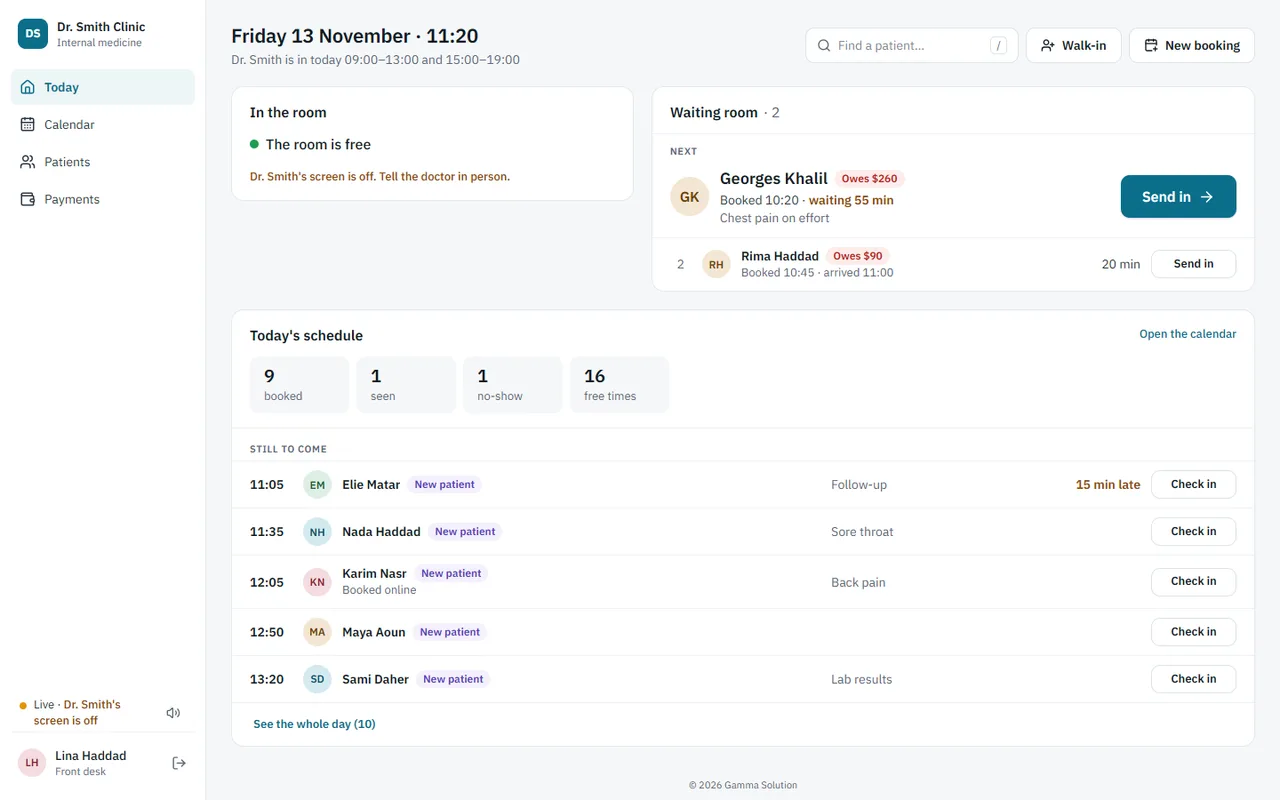
The front desk's Today screen: the room is free, two patients are waiting with a Send in button, and the rest of today's bookings are listed below.

A day at the clinic

This is what a normal morning looks like. Everyone sees what they need and nothing more.

  1. The patient is booked

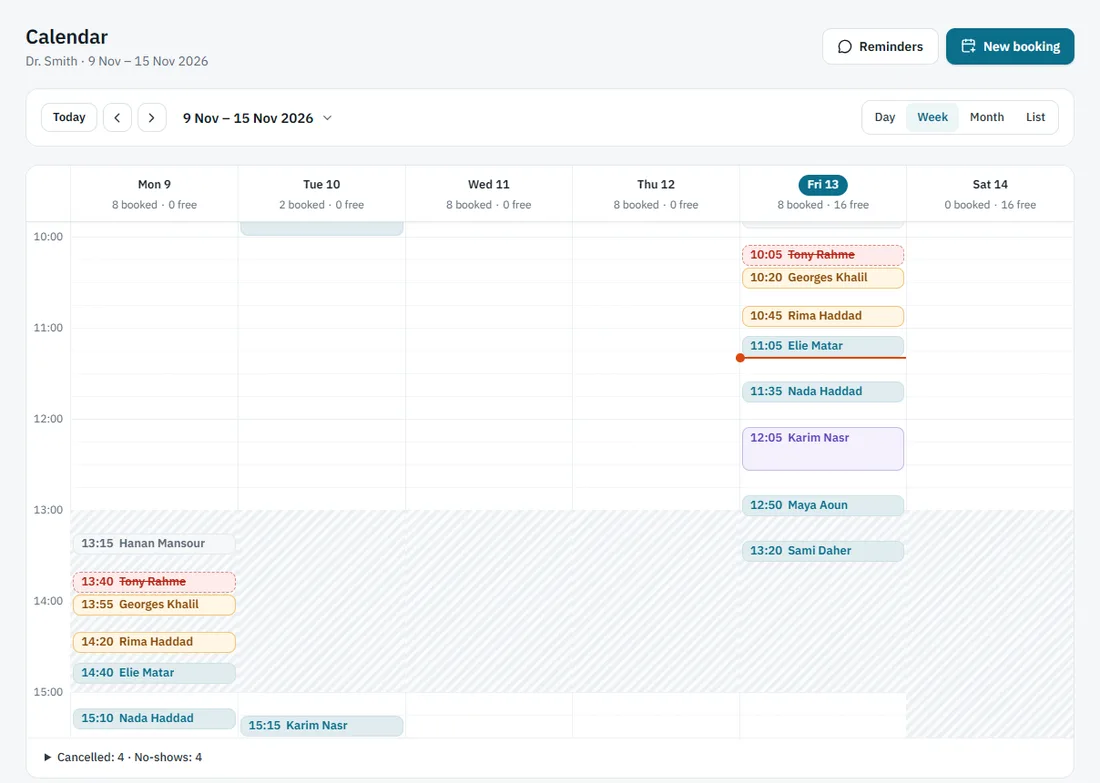
    The front desk books the visit in the calendar, by phone or at the desk. Patients can also book on your own website. Free times are shown, so nobody has to guess.

    The calendar, showing the week with each booking as a coloured block.
  2. The front desk sends them in

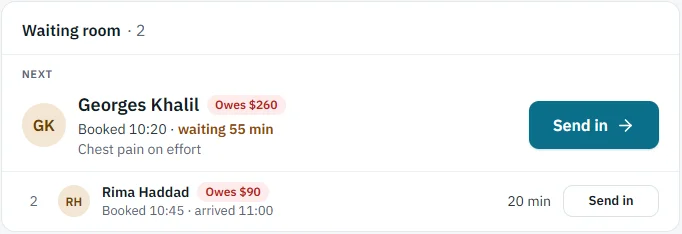
    When the patient arrives, the desk checks them in. When the doctor is free, one button, Send in, and the doctor sees it on their own screen at once.

    The waiting room: the next patient, with a large Send in button.
  3. The doctor has the patient in front of them

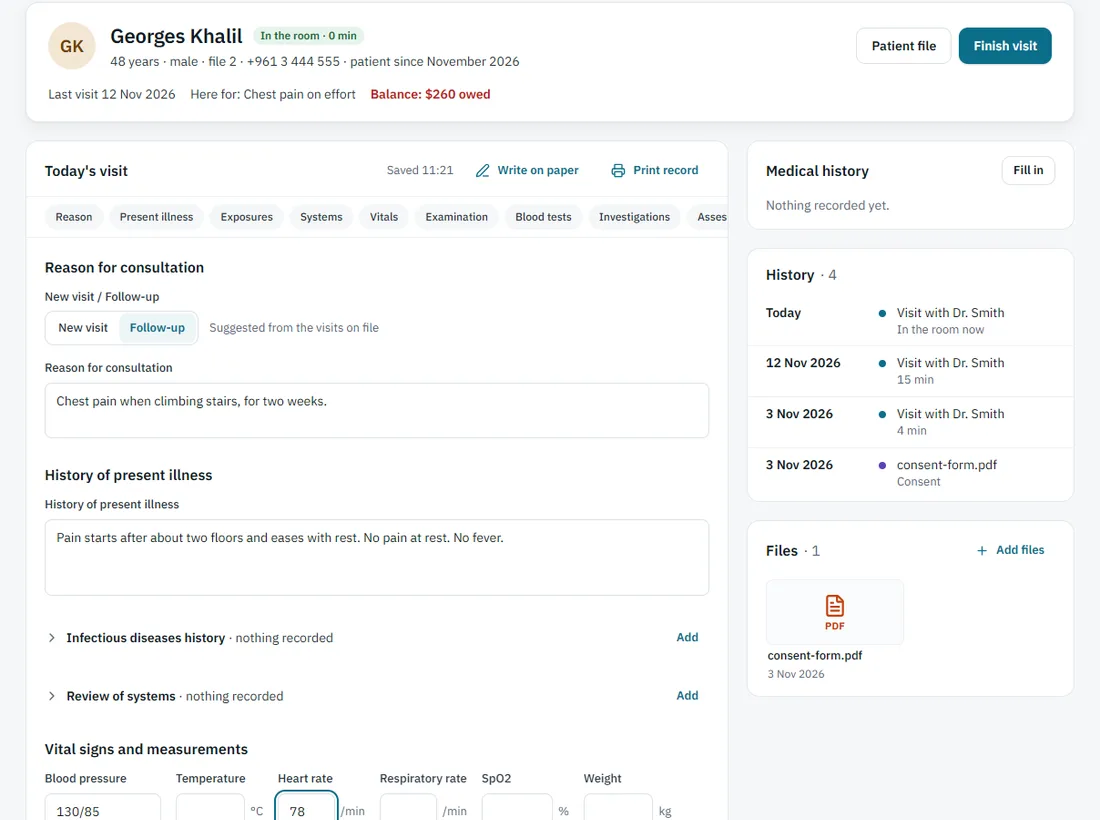
    The room shows who is in, their history and their files. The visit note fills in as the doctor types: the complaint, vitals, examination and blood tests.

    The doctor's room: the patient at the top, and today's visit note with the reason for the consultation and vital signs.
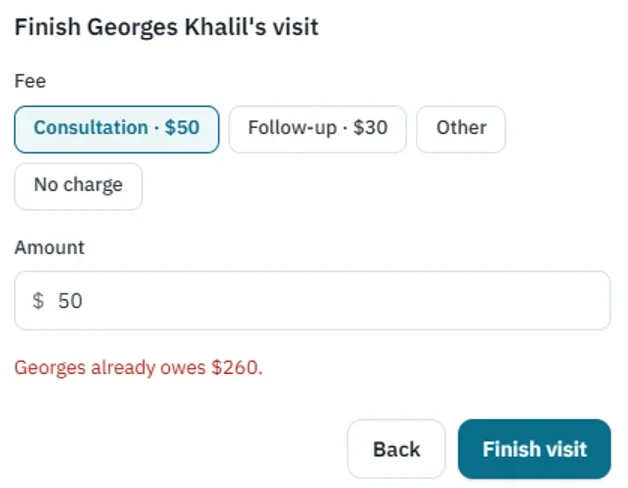
  4. Finish the visit, and the payment follows

    One step to finish the visit: pick the usual fee or type another. The desk takes the payment and prints a receipt, and the day's cash adds up on its own.

    The Finish visit window with the clinic's usual fees to pick from.

Everything it does

All of this is in the app today.

Scheduling and reminders

  • Day, week, month and list views of the calendar
  • Book, move, cancel and mark no-shows
  • Your working hours and days off, with a warning before a booking clashes
  • Tomorrow's patients in one list, each with a WhatsApp message ready to send
The front desk, live

  • Who is in the room, who is waiting, who is still to come
  • Check in patients and add walk-ins
  • One Send in button, and the doctor's screen updates at once, with no refreshing
  • A sound and a note when someone books online

The doctor's room

  • The patient at a glance: last visit, history and files
  • A visit note with vitals, examination by system and blood tests you can follow over time
  • The medical history, filled in once and kept on the patient
  • Patient files in folders; open PDF, Word, Excel and pictures right in the app

Prescriptions on your own paper

  • Set up your printed pad once, from a photo or a scan
  • Type straight onto the sheet on screen, and print only the writing on your pad
  • Start from the visit's medicines, a sick-leave note or a letter
  • Each paper is saved with the patient, and a reprint comes out the same

Payments and the day's cash

  • Your usual fees, picked in one tap when the visit ends
  • Payments by cash, card or wallet, with what each patient still owes
  • Receipts for a small receipt printer
  • The day's cash by method, ready to count and print. Dollars, with the lira if you want it

Your clinic's website

  • Build pages from ready-made sections, with your pictures, and preview before you publish
  • Online booking that shows free times and keeps spam out
  • Articles and cases, shown only after the patient's consent is recorded
  • On your own domain

Staff and control

  • An account for each person on your team
  • You choose what the front desk can see, such as visit notes and files
  • An activity log in plain sentences: who opened or changed what

Safety

  • Two-step sign-in
  • Encrypted backups kept away from the server
  • Export all of your clinic's data whenever you want
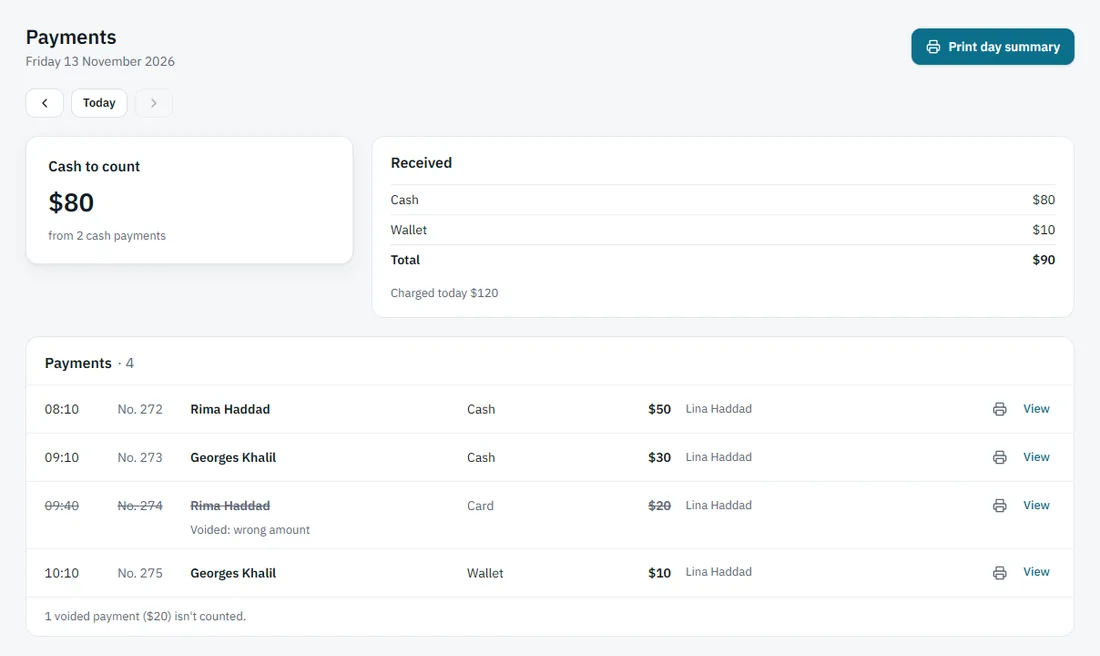
The Payments page: the cash to count for the day, what was received by method, and each payment with a receipt.

Your clinic, your name

The website and the app for your staff both run on your own domain. Patients see your clinic's name and your colours.

  • A website of your own. Your patients find you, read about you and book online.
  • An app address of your own. Your team signs in on a page that carries your clinic's name.
  • Our name stays out of your website. Your staff app has one small line at the bottom that names us.
yourclinic.com Your clinic's website, with online booking
app.yourclinic.com Your team's app

Privacy and safety

Patient files are private. The app is built so that they stay that way.

  • Your data stays yours alone

    Each clinic's data is kept apart from every other clinic's. The database itself enforces it, not only the app.

  • On our own server

    Your clinic's data runs on a server we manage ourselves, not on a shared medical service.

  • Backups that are encrypted

    The database is copied every six hours and the files every night. Everything is encrypted and stored away from the server, in the EU.

  • Two-step sign-in

    Each person can switch on a second code from their phone when they sign in.

  • You can see who did what

    The activity log says who opened or changed a file. It never shows what was written in a note.

  • You can take it all with you

    Your clinic's admin can export all of its data, with every file, whenever they want.

Gamma Solution is used at the clinic of Dr. Mario Abi Rached.

How it starts

  1. You message us

    Send us a message on WhatsApp and tell us about your clinic.

  2. We set you up

    We set up your clinic and your website, with your name and your colours.

  3. You start booking

    Your team signs in and the first patients are booked.

Want to see it for your clinic?

Send us a message. We will answer you in person.

Message us on WhatsApp